To monitor SNMP(simple network management protocol) enabled cisco switches and routers in Zabbix server, you need to configure the server for SNMP. In this post, I have used a Debian 8 server running  zabbix and setup SNMP in a cisco switch for monitoring its interfaces and bandwidth. The configuration will be in three parts. In the first step, we will install SNMP on the Debian server hosting the Zabbix. In the second step, we will configure the switch for snmp host information and community string. In the last step, we will configure a Zabbix host to poll SNMP data from the cisco switch. [Read more…] about How to Configure SNMP in Zabbix Server (Debian) to monitor Cisco Switches
Tutorial
How to setup Gmail SMTP relay to send email from your domain?
Scenario: you have your own domain and have setup an email address in your server using, say, roundcube. Now, you want to send emails using a reliable free third party SMTP relay.
What steps you need to follow to use Gmail SMTP?
- You have to have postfix installed in your server. This post will show you how to configure postfix to use Gmail SMTP relay. But you to remember that Gmail put limit of how many emails you can send using their relay. If your service needs to sends thousands of email per day, you may considering buying third party SMTP relay service.
- Configure the Gmail account.
[Read more…] about How to setup Gmail SMTP relay to send email from your domain?
How to Check and Enable Gzip Compression in CentOS for WordPress?
Gzip compression is used to zip or compress webpages in the webserver before serving it to the users’ web browser. Thus it saves network bandwidth because the server sends the compressed form of your webpage over the network. Another advantage of Gzip compression is faster page loading time. When the users’ machines receive the compressed format of webpages, it only takes a few milliseconds to decompress it.
[Read more…] about How to Check and Enable Gzip Compression in CentOS for WordPress?
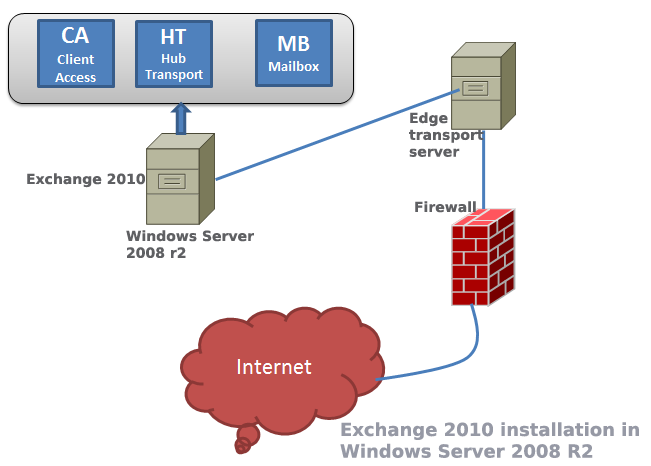
12 Steps to Install Exchange Server 2010
Among all Microsoft’s solution Exchange is considered a bit tough to master in. But your  learning curve will be much more smoother if you follow a few simple steps described in the following paragraphs.
Steps to Configure Direct Access in Windows Server 2012
Direct access is the commercial name of Windows 2012 server’s remote access solution. In earlier versions of Windows, remote access offered limited features to the remote users. Windows 2012 is the first Microsoft server that makes remote access users feel like working within the corporate network. [Read more…] about Steps to Configure Direct Access in Windows Server 2012
Types of Virtualization Technology-Advantages vs. Disadvantages
Virtualization helps to integrate several servers into a physical server in such a way that every server appears as a standalone server to the users. The three types of popular server virtualizations are OS virtualization, hardware emulation and paravirtualization. [Read more…] about Types of Virtualization Technology-Advantages vs. Disadvantages
8 Effective Ways to Improve IIS 7.5 Performance
Like any other web servers, IIS 7.5 is capable of running web applications and sites blazing fast when you fine-tune some of its important performance parameters. This post will give you a list of effective methods that can make your Internet information server optimized for serving faster web pages to your users. [Read more…] about 8 Effective Ways to Improve IIS 7.5 Performance
Active vs Passive FTP Mode: Which One is More Secure?
FTP or file transfer protocol is used to transfer files between two computers: one is FTP host or server and another is FTP client. In addition to transferring files, FTP helps to gain access to the physical location of the server to modify files such as file deleting, folder creating or even modifying file contents.
Before knowing the difference between active and passive FTP, you need to know how FTP functions. Normally, when you open FTP connectivity with a FTP server, there opens two connections between the computers: one is used to transfer data and another one is used to transfer control signals. Both the channels are TCP connections. For commands, TCP port number 21 is used and the port number 20 is used for data.
Benefit of active FTP: it increase FTP server security
Benefit of passive FTP: it requires less configuration changes on client computer.
[Read more…] about Active vs Passive FTP Mode: Which One is More Secure?
How to Build Failover Cluster in Windows Server 2008
The main objective of a failover cluster is to ensure high availability of services. A failover cluster means that only one server–which is also known as active server–in the cluster will provide the service such as a file server or webserver. When this active server will go offline or will be out of service, another server in the cluster will provide the same service, without causing any service disruption. For instance, you have configured two windows 2008 servers in cluster mode to offer web service to your users. If, for any reason, the active server goes down, then the passive server will serve the webpages to your customers. [Read more…] about How to Build Failover Cluster in Windows Server 2008
How to Configure VPN,RAS and IPSec Policy in Windows Server
VPN is a trusted and secure network, which use tunneling and protocol(PPTP,L2TPIPSec) to make data transmission through the public network.
RAS: remote access service used to access server remotely from client terminal using dial-up connection.
IAS:Internet authentication service is used to remotely and centrally manage all RAS server and keep remote access policy centrally in a single location. [Read more…] about How to Configure VPN,RAS and IPSec Policy in Windows Server
