• Skip to main content
  • Skip to primary sidebar
  • Skip to footer

securitywing

Containers

Top 10 Reasons Why AWS ECS is Better than Kubernetes

Both Kubernetes and ECS are now capable of handling complex containerized workloads, and there are times when you might consider comparing them based on specific use cases and organizational needs.Here are some reasons why one might prefer AWS ECS (Elastic Container Service) over Kubernetes:

  1. Integration with AWS Ecosystem: ECS is deeply integrated with other AWS services like AWS Identity and Access Management (IAM), CloudWatch, and Elastic Load Balancing, making it simpler to use within the AWS environment.
  2. Simplicity and Ease of Use: ECS has a more straightforward setup and requires less configuration than Kubernetes, which can have a steep learning curve due to its complexity.
  3. Fully Managed: ECS provides a fully managed service, where AWS manages the control plane. This reduces the operational overhead as you don’t need to manage or update the cluster management software.
  4. Cost Management: With ECS, you only pay for the AWS resources you use (like EC2 instances or Fargate tasks). There’s no additional charge for the ECS service itself, whereas managing a Kubernetes cluster might incur costs for the management layer or require more expertise which could indirectly increase costs.
  5. Security: AWS handles the security of the underlying infrastructure for ECS. Also, policies and roles are easily integrated through AWS IAM, which might be more streamlined for users already invested in AWS security tools.
  6. Serverless Option with AWS Fargate: ECS supports Fargate, which allows you to run containers without managing servers or clusters, reducing the operational complexity even further compared to setting up Kubernetes for similar serverless functionality.
  7. Consistent Experience on AWS: For businesses already on AWS, using ECS means staying within a familiar environment, with consistent tooling, billing, and support.
  8. Scalability: While Kubernetes is highly scalable, ECS scales automatically with your AWS resources and integrates seamlessly with AWS’s autoscaling features, which can be less complex to manage.
  9. Networking: ECS with AWS VPC gives straightforward networking setup. While Kubernetes can handle networking, its configuration might be more complex, especially in multi-cloud or hybrid scenarios.
  10. Task Definitions: ECS uses straightforward JSON task definitions for application deployment, which can be simpler than Kubernetes’ YAML files, especially for those not needing the extensive customization Kubernetes offers.

[Read more…] about Top 10 Reasons Why AWS ECS is Better than Kubernetes
How to Install AWS CLI and Terraform in Jenkins Docker Container

To install a AWS CLI in a Jenkins running on a docker container, you can follow the below steps. But it would be better if you create  a custom  Jenkins docker file with AWS CLI and then create a custom image to spin up the Jenkins container. But sometimes, you may need to install various packages.


Install AWS CLI in Jenkins Docker Container

  1. Take a note of the running Jenkins containers and then run to login as a root

         docker exec -u 0 -it 85f0af1f40e4 bash

  1. Next, update the packages list:

         apt-get update

  1. Download AWS CLI zip file from AWS.

[Read more…] about How to Install AWS CLI and Terraform in Jenkins Docker Container

How to Create a Helm Chart in Windows for Minikube

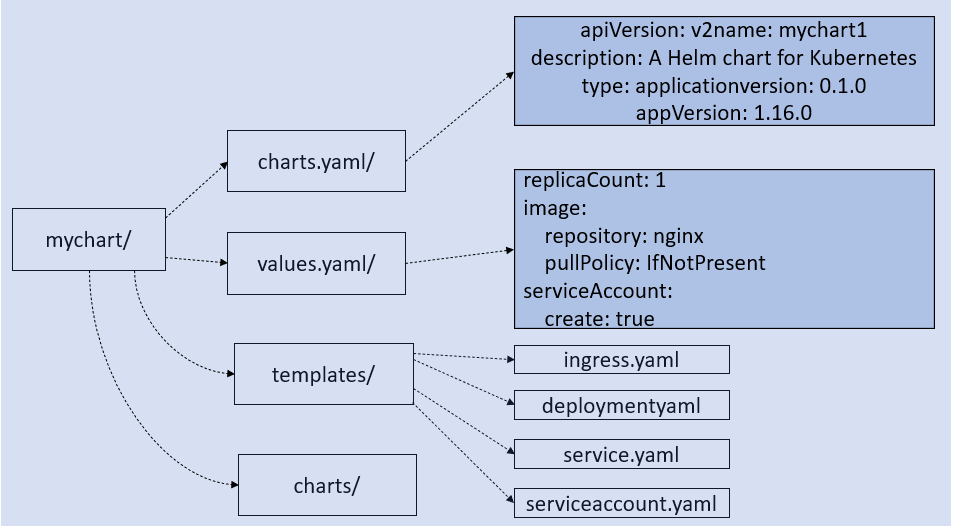
Helm package manager is used to deploy applications in the Kubernetes cluster. By packaging your app using helm allows to deploy it with one command instead of using “kubectl create/apply” command. Another benefit of using helm is that you can easily upgrade and rollback your apps when required because helm uses version control.


Follow the three simple steps creating the helm chart

  1. Create a skeleton chart using the helm command.
  2. Update the values.yaml and the templates/ files to meet your deployment requirements
  3. Package the chart and upload it a helm repository.

[Read more…] about How to Create a Helm Chart in Windows for Minikube

5 Steps to Setup a Nexus3 repository using Docker on Virtual Box.

Scenario: To create a private docker repository in your local machine for development purpose, you can deploy a Nexus3 docker image with a  persistent volume in a minute. You can either install the docker in your host machine or you can install a Ubuntu virtual box and then install docker on it.

Step1:

At first create Ubuntu virtual machine and then install docker. Next, pull the nexus3 docker image .

docker pull sonatype/nexus3

Ref:https://hub.docker.com/r/sonatype/nexus3/

Step 2:

Create a docker volume and run the Nexus container

docker volume create –name nexus-data [Read more…] about 5 Steps to Setup a Nexus3 repository using Docker on Virtual Box.

3 Steps to Install Minikube on Windows 10

Minikube helps to create the Kubernetes environment on a personal computer. This post aims to show you a few simple steps to install Minikube on Windows Machine. Before installing minikube, make sure you have installed kubectl.

Step 1: Install kubectl

Go to https://kubernetes.io/docs/tasks/tools/install-kubectl/#install-kubectl-on-windows and following the link under “Install Kubectl on Windows”.

Create a folder called Kube or anything and then copy and paste the minikube .exe file in that folder.

Next, click on “This PC” then properties and then advance and then click on environmental variables. [Read more…] about 3 Steps to Install Minikube on Windows 10

Primary Sidebar

Please help us sharing

Categories

  • Artificial Intelligence
  • AWS
  • Basics
  • Containers
  • Cryptocurrency
  • Cyber
  • Cyber Insurance
  • Internet Security and Safety
  • IS Audit
  • IT Security Exams
  • Law & Human Rights
  • Network Security Tips
  • Off Track
  • Social Media Governance
  • Tech Comparisons
  • Tech Stack Suitability
  • Telecom
  • Tutorial

CISSP Sample Test

Take a CISSP Sample Test

CISA Sample Test

CISA IT governance Sample test

Please Follow Us

Contact us for Ads

Go to Contact Form

Search

Footer

Copyrights

Protected by Copyscape Duplicate Content Detection Software

Securitywing.com reserves the copyrights of all of its published articles.No contents of this site is permitted to be published to anywhere else in the Internet.If any contents are found in any other websites, securitywing reserves the rights to file a DMCA complaint. But you have the right to use the link of any relevant article of this site to point from your website if you consider that it might improve the quality of your article.

Tags

antivirus audit AWS backup browser check cisco cloud computer cyber data database ddos email encryption firewall home hsrp ids internet it kubernetes linux load balancing malware network protection putty risk router security security tips server social media ssh SSL tools virus vpn vulnerability web webserver website windows wordpress
