When an IT organization relies on a single DevOps engineer for managing infrastructure without redundancy in that role, several significant risks emerge: [Read more…] about Why IT Organizations Should Consider Having At Least Two DevOps Engineers or Equivalent Roles?
Off Track
Six Easy Steps to Create a Self-Signed Certificate on Ubuntu Server
A self-signed certificate is an SSL certificate that is signed by the person or organization creating it, rather than a trusted Certificate Authority (CA). You can use a self-signed certificate for testing purposes, or to provide encryption within internal networks. If you are looking into renewing a self-signed SSL, please take a look at How to Renew Self-Signed SSL Certificate with OpenSSL Tool in Linux
Here’s the step-by-step process for creating a self-signed certificate on an Ubuntu server: [Read more…] about Six Easy Steps to Create a Self-Signed Certificate on Ubuntu Server
What Elon Musk Needs Doing to Make X.com(Twitter) Great Again?
As of mid-2024, X (formerly Twitter) has undergone significant transformation under Elon Musk’s ownership. The platform has rebranded to X, aiming to become an “everything app” similar to WeChat. It has introduced longer posts, video content enhancements, and is working on integrating payment services. Yet, many users still think that Elon Musk could improve it even further by addressing the following issues. [Read more…] about What Elon Musk Needs Doing to Make X.com(Twitter) Great Again?
Top 10 Cloud Based Threats
Cloud-based threats refer to security risks and vulnerabilities that are specifically associated with cloud computing environments. These threats target cloud services, platforms, and infrastructure, as well as the data and applications hosted in the cloud. As organizations increasingly adopt cloud technologies for storage, computing, and other services, understanding these threats is crucial for maintaining security and compliance. [Read more…] about Top 10 Cloud Based Threats
3 Steps to setup SSH remote Access to EC2 from Cloud9
3 Steps to Setup EC2 EBS Volume Disk Space Monitoring using Cloudwatch
The default monitoring of Amazon EC2 does not track the EBS disk space. To monitor disk space in EC2 instance, you need can either manually installed Cloudwatch Agent or can use SSM to install the agent. After installing you
Step 1. Instal cloudwatch agent
sudo yum -y install amazon-cloudwatch-agent
Step 2. create a config.json file in the following location.
/opt/aws/amazon-cloudwatch-agent/bin/config.json
{

"agent": {

"metrics_collection_interval": 60,

"run_as_user": "root"

},

"metrics": {

"append_dimensions": {

"AutoScalingGroupName": "${aws:AutoScalingGroupName}",

"ImageId": "${aws:ImageId}",

"InstanceId": "${aws:InstanceId}",

"InstanceType": "${aws:InstanceType}"

},

"metrics_collected": {

"disk": {

"measurement": [

"used_percent"

],

"metrics_collection_interval": 60,

"resources": [

"*"

]

},

"mem": {

"measurement": [

"mem_used_percent"

],

"metrics_collection_interval": 60

}

}

}

}
How to Create a Helm Chart in Windows for Minikube
Helm package manager is used to deploy applications in the Kubernetes cluster. By packaging your app using helm allows to deploy it with one command instead of using “kubectl create/apply†command. Another benefit of using helm is that you can easily upgrade and rollback your apps when required because helm uses version control.
Follow the three simple steps creating the helm chart
- Create a skeleton chart using the helm command.
- Update the values.yaml and the templates/ files to meet your deployment requirements
- Package the chart and upload it a helm repository.
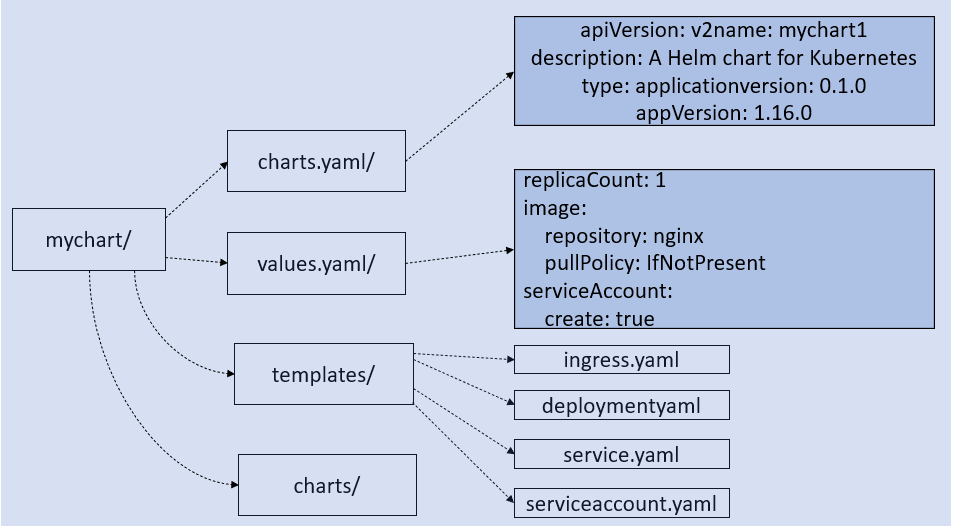
[Read more…] about How to Create a Helm Chart in Windows for Minikube
5 Steps to Auto-Create Helm  Charts and upload to S3 Using Jenkins
After packaging the helm charts, you need to store it in a repository so that it can be easily deployed using helm in the Kubernetes or Minikube. This post aims to show you how to set up the AWS S3 bucket as a Helm chart repository. Using the steps below you will be able to setup Helm S3 repo for both Minikube and KOPs created cluster hosted in AWS.Â
Scenario: we will create the environment on a local computer, where we have installed Minikube using a virtual box. We have created another VirtualBox for Jenkins running on Ubuntu. An easy and alternative approach is to install Jenkins using the Helm chart in the Minikube. To replicate the production environment, I have decided to install Jenkins outside of the Kubernetes environment. The reason for why I want to keep Jenkins outside of the Kubernetes cluster is to make sure the Kubernetes cluster issue does not affect the Jenkins pipelines that we use to deploy codes in other environments.
Jenkins server VM needs to run on the same network where you have installed Minikube. In my case, my Jenkins has two network adapter- one is NAT and another one is host-only. Make sure you attach the same host-only adapter that you have attached to the Minikube. [Read more…] about 5 Steps to Auto-Create Helm  Charts and upload to S3 Using Jenkins
3 Steps to Install Kubectl, Helm 3 and S3 Plugin in Ubuntu to Store Charts in S3 Bucket
This post aims to show you how to install Kubectl, Helm 3 and S3 plugin so that you can easily store the chart in a S3 bucket form your Ubuntu machine. Though I always use an automated approach to create and store the helm chart, I had to create a helm chart in Ubuntu in order to identify and Helm S3 plugin compatibility issue.
1. Install kubectl
To install kubectl in Ubuntu
nano script.sh
chmod 775 script.sh
Next, paste then the following lines to create a shell script. [Read more…] about 3 Steps to Install Kubectl, Helm 3 and S3 Plugin in Ubuntu to Store Charts in S3 Bucket
How to Run MySQL Database Anonymize Script from Linux Bash Shell
How to run mysql annoymise scripot from bash shell.
To anonymize the production database for using in the test environment, you can create a simple script that can run from the Linux Bash shell with a single command.
At first download a sample database:
# wget https://github.com/datacharmer/test_db/archive/master.zip
Next, unzip the file
#Â unzip master.zip
[Read more…] about How to Run MySQL Database Anonymize Script from Linux Bash Shell
