When you have mulitiple AWS accounts and a specific privated DNS name that you want to resolve from a VPC in a different account you need to allow the hosted zone to be resolved from a differnet acccount. For example, you have a hosted zone in account A with several types of records and you want a DNS query for that zone get resovled from a specific VPC in account B. To allow the account B VPC resolve the hosted zone of account A, you need to do the following
AWS
How to Enable AWS Cross Account ECR Image Replication
Docker image hosted in ECR in  a AWS account can be replicated into another AWS account by enabling the cross account replication setup. For example, you host a docker image in AWS account A and you have a ECS cluster where you need to deploy the docker image. Â
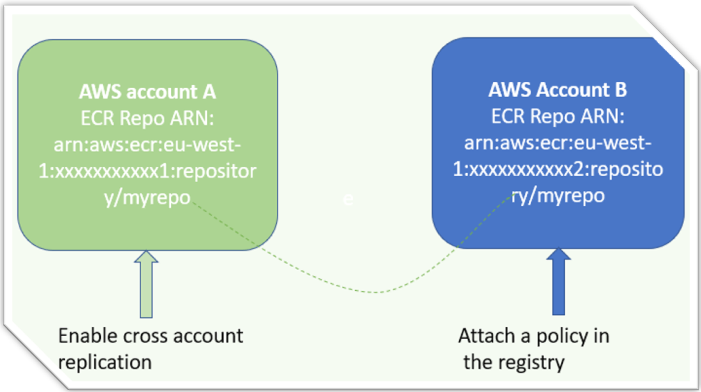
[Read more…] about How to Enable AWS Cross Account ECR Image Replication
How to Mount Amazon EFS in EC2-CentOS Instance
With Amazon EFS(elastic file system)mounted in the EC2, you can signifincalty reudce cost of storge becaues you pay only for the storgrage used by your applications/data. EFS supports NFS
In the AWS console, search for EFS and then create a volume. When you attahce a security group in the EFS, make sure it allows traffc on port 22 from the EC2 instance. Also, take note of the DNS name of EFS, which will be used to mount the volumen in the EC2.
SSH to the Ec2 and create a mount directory.
sudo mkdir efs
Note:if you want you can specify the full path of the mount directory such as /home/efs or /var/efs [Read more…] about How to Mount Amazon EFS in EC2-CentOS Instance
How to Install Boto3 for AWS SDK using Anaconda in Windows
Boto3 allows the python developers to create and manage AWS services such as EC2. You may need to install boto3 in your windows machine for AWS cloud based services development and automation. The easiest way to configure boto on your machine is to install anacond at first. You can download anaconda at https://www.anaconda.com/distribution/.
[Read more…] about How to Install Boto3 for AWS SDK using Anaconda in Windows
How to Setup AWS CloudFront for Externally Registered Domain Name
If you do not want to transfer your domain to Amazon DNS(Route 53) and want to use AWS CloudFront to deliver your content, you can use the instructions below to set up your content delivery network.
Scenario 1: you are using an external DNS for CloudFront and do not want to create a hosted zone in Amazon route 53.
For example, your domain is registered with Namecheap and you have already created a CloudFront distribution for your domain example.com. the easiest solution will be to create a CNAME record in Namecheap DNS and point it to the CloudFront URL.
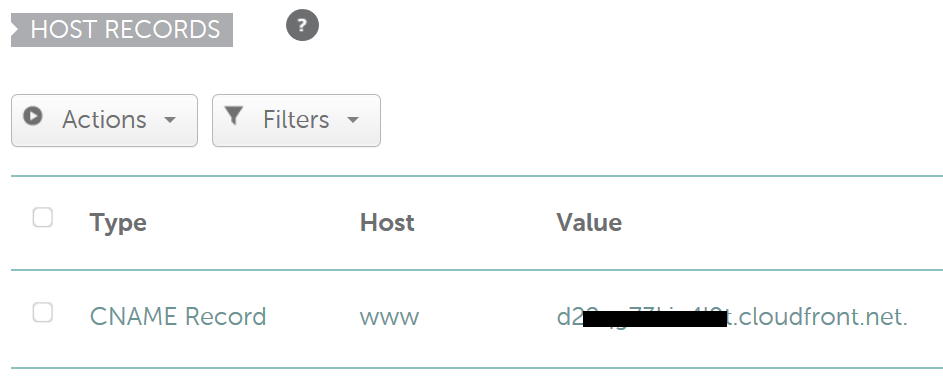
As you know the CNAME record allows you to only point the subdomain to another domain. You will not be able to send your all traffic from example.com to the CloudFront. Only www.example.com will be forwarded to the CloudFront URL. If you want both the www and non-www or naked/apex domain be forwarded to CloudFront then you need to follow the instruction given below in scenario 2
[Read more…] about How to Setup AWS CloudFront for Externally Registered Domain Name
How to Setup SSL in AWS application load balancer for WordPress
How to setup SSL in AWS application load balancer for WordPress.
AWS application load balance helps to off load the web server by taking the responsibility of encrypting and decrypting the SSL connection. To implement SSL in WordPress you need to apply the SSL certification only on the load balancer. However, you still need to add the certificate in the server if you want https traffic between the load balancer and the web server. This post only focuses on how to setup SSL in AWS application load balancer for WordPress and make a few configuration changes on the wp-config file to get WordPress working with SSL. [Read more…] about How to Setup SSL in AWS application load balancer for WordPress
