• Skip to main content
  • Skip to primary sidebar
  • Skip to footer

securitywing

wing

What is VPN and How it Works?

By reading this post you can learn about VPN and its workings. VPN is just a term we use to describe a system which makes communication between two computers, regardless of how far they are, within a secure channel. Here the secure channel means you can convert the public network secure. As you know that a public network is nothing but the Internet, where can have access to any serve to get the required information.

So, A VPN is such a technology where you need to have two computers, both of which can be located in separate towns or countries, and an encryption technique to start a secure communication between the channels. The function of the encryption mechanism is to make the data or message encrypted so as no can in the Internet can decipher your message. If no one understands what you are talking to your friend residing in a different country, then you can say that your network is virtually private- this is why we call it VPN (virtual private network). [Read more…] about What is VPN and How it Works?

Firefox Security Settings and Features

There are certain security issues that would help you keep your browsing experience smooth and safe with Firefox.As you know that web browser work as a middle man between you and the webpages. When you request for a webpage from your computer by typing a web address (URL), all the underline works such as grabbing the pages and displaying it to you in human readable format is done by the web browser. The following are the most crucial security settings of Firefox. [Read more…] about Firefox Security Settings and Features

PIX Firewall Configuration Basics

This post intends to familiarize you with some of the basics skills that you need to configure a PIX firewall. The configuration commands will help you to assign name to a PIX interface to configure routing and to configure network address translation including PAT(port address translation).

To erase configuration: write erase

To save configuration: write terminal [Read more…] about PIX Firewall Configuration Basics

How to Configure VPN,RAS and IPSec Policy in Windows Server

VPN is a trusted and secure network, which use tunneling and protocol(PPTP,L2TPIPSec) to make data transmission through the public network.

RAS: remote access service used to access server remotely from client terminal using dial-up connection.

IAS:Internet authentication service is used to remotely and centrally manage all RAS server and keep remote access policy centrally in a single location. [Read more…] about How to Configure VPN,RAS and IPSec Policy in Windows Server

Windows DNS Server Configuration

DNS or domain name system is one of the most important parts of client-server model. Without a DNS no client could be part of a domain and there will be no way you can convert domain name into the IP address of the server. In this post you will find basic procedures that you can use to configure DNS for your domain controller. Though the procedures described in this post is applicable to Windows 2003 server environment, but it will help you to develop a good understanding to deploy and manage a DNS sever higher than Windows 2003 environment. [Read more…] about Windows DNS Server Configuration

Exchange Server 2003 Tutorial

Exchange server 2003 installation process:

Before installing exchange server on windows server you need to have installed the following Windows components:

  1. ASP.NET
  2. IIS
  3. SMTP
  4. NNTP
  5. WWW

To install the above mentioned components you need to insert your Windows server CD in your CD or DVD drive and then select those components from the add remove components section in the control panel. To select SMTP, NNTP and WWW, click on IIS and then click details.

[Read more…] about Exchange Server 2003 Tutorial

7 Different Types of Firewalls

There are several types of firewalls that work on different layers of the OSI model. Depending on the kind of service and security you need for your network, you need to choose the right type of firewall. The following are the list of seven different types  firewalls that are widely used for network security.

  • Screened host firewalls
  • Screened subnet firewalls
  • Packet filter firewalls
  • Stateful inspection firewalls
  • Hybrid firewalls
  • Proxy server firewalls
  • Application level (gateway) firewalls

Screened host firewalls:

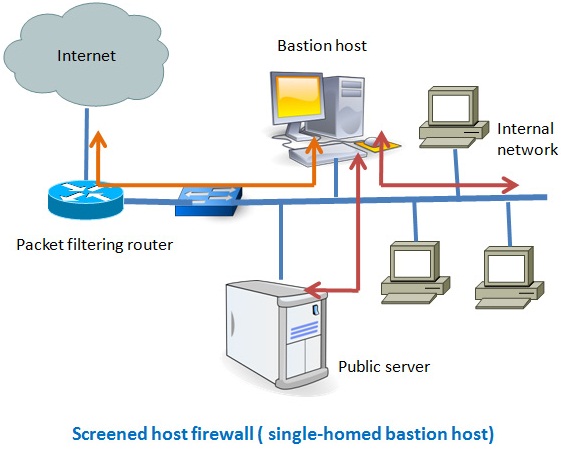
There are two types of screened host-one is single homed bastion host and the other one is dual homed bastion host. In case of single homed bastion host the firewall system consists of a packet filtering router and a bastion host. A bastion host is basically a single computer with high security configuration, which has the following characteristics:

  • Traffic from the Internet can only reach the bastion host; they cannot reach the internal network.
  • Traffic having the IP address of the bastion host can only go to the Internet. No traffic from the internal network can go to the Internet.

screened host firewall

[Read more…] about 7 Different Types of Firewalls

Laptop Security Devices and Tips

Providing physical security to your laptop is your primary concern if you are a frequent travel or on the move. There are a number of devices and precautions that you can take to secure your laptop and even can get back your laptop if it gets stolen. The following are a list of devices and suggestions the you may consider as a solution to your laptop security. [Read more…] about Laptop Security Devices and Tips

Host Based IDS vs Network Based IDS

Based on the location in a network, IDS can be categorized into two groups. One is host based IDS and the other is network based IDS. Both have its own advantages and distant ages. Before you decide which IDS suits your network environment the best you need to have a clear concept of both types of IDS.

Network based IDS: these types of IDS are strategically positioned in a network to detect any attack on the hosts of that network. To capture all the data passing through the network, you need to position your IDS at the entry and exit point of data from your network to the outside world.  You can also position some IDS near the strategic positions of your internal network, depending on the level of security needed in your network. Since a network based IDS need to monitor all the data passing through the network, it needs to be very fast to analyze the traffic and should drop as little traffic as possible. [Read more…] about Host Based IDS vs Network Based IDS

Buffer Overflow Protection Tutorial

When you write a simple program, for example, to print user name with greetings. For this program to run you assign character string 38 in the following way

Char name (38)

Here “name” is the variable name. The above code specifies that you name or users’ input would not be more than 38 characters long because you have already assigned only 38 bit of data into the buffer. So, buffer overflow is such type of attack where the buffer memory is bombarded with more data than it can actually handle. [Read more…] about Buffer Overflow Protection Tutorial

« Previous Page
Next Page »

Primary Sidebar

Please help us sharing

Categories

  • Artificial Intelligence
  • AWS
  • Basics
  • Containers
  • Cryptocurrency
  • Cyber
  • Cyber Insurance
  • Internet Security and Safety
  • IS Audit
  • IT Security Exams
  • Law & Human Rights
  • Network Security Tips
  • Off Track
  • Social Media Governance
  • Tech Comparisons
  • Tech Stack Suitability
  • Telecom
  • Tutorial

CISSP Sample Test

Take a CISSP Sample Test

CISA Sample Test

CISA IT governance Sample test

Please Follow Us

Contact us for Ads

Go to Contact Form

Search

Footer

Copyrights

Protected by Copyscape Duplicate Content Detection Software

Securitywing.com reserves the copyrights of all of its published articles.No contents of this site is permitted to be published to anywhere else in the Internet.If any contents are found in any other websites, securitywing reserves the rights to file a DMCA complaint. But you have the right to use the link of any relevant article of this site to point from your website if you consider that it might improve the quality of your article.

Tags

antivirus audit AWS backup browser check cisco cloud computer cyber data database ddos email encryption firewall home hsrp ids internet it kubernetes linux load balancing malware network protection putty risk router security security tips server social media ssh SSL tools virus vpn vulnerability web webserver website windows wordpress