The purpose of any cryptography is to ensure the confidentiality, authenticity, non-repudiation and integrity of the data. And all these goals are achieved with the use of cryptography keys. The 128 bit key is such a type of key that ensure all the intended objectives of using a crypto-system or cryptographic algorithm.it is the key which needs to be secret in order to keep information private. [Read more…] about What is 128 Bit Encryption?Why the Length is Important?
Network Security Tips
What is VPN and How it Works?
By reading this post you can learn about VPN and its workings. VPN is just a term we use to describe a system which makes communication between two computers, regardless of how far they are, within a secure channel. Here the secure channel means you can convert the public network secure. As you know that a public network is nothing but the Internet, where can have access to any serve to get the required information.
So, A VPN is such a technology where you need to have two computers, both of which can be located in separate towns or countries, and an encryption technique to start a secure communication between the channels. The function of the encryption mechanism is to make the data or message encrypted so as no can in the Internet can decipher your message. If no one understands what you are talking to your friend residing in a different country, then you can say that your network is virtually private- this is why we call it VPN (virtual private network). [Read more…] about What is VPN and How it Works?
PIX Firewall Configuration Basics
This post intends to familiarize you with some of the basics skills that you need to configure a PIX firewall. The configuration commands will help you to assign name to a PIX interface to configure routing and to configure network address translation including PAT(port address translation).
To erase configuration: write erase
To save configuration: write terminal [Read more…] about PIX Firewall Configuration Basics
7 Different Types of Firewalls
There are several types of firewalls that work on different layers of the OSI model. Depending on the kind of service and security you need for your network, you need to choose the right type of firewall. The following are the list of seven different types firewalls that are widely used for network security.
- Screened host firewalls
- Screened subnet firewalls
- Packet filter firewalls
- Stateful inspection firewalls
- Hybrid firewalls
- Proxy server firewalls
- Application level (gateway) firewalls
Screened host firewalls:
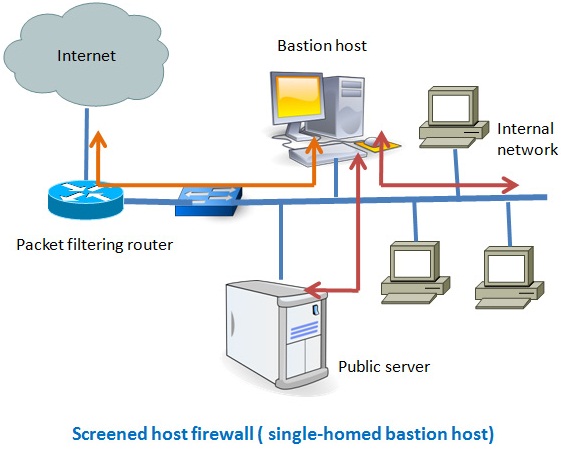
There are two types of screened host-one is single homed bastion host and the other one is dual homed bastion host. In case of single homed bastion host the firewall system consists of a packet filtering router and a bastion host. A bastion host is basically a single computer with high security configuration, which has the following characteristics:
- Traffic from the Internet can only reach the bastion host; they cannot reach the internal network.
- Traffic having the IP address of the bastion host can only go to the Internet. No traffic from the internal network can go to the Internet.
Host Based IDS vs Network Based IDS
Based on the location in a network, IDS can be categorized into two groups. One is host based IDS and the other is network based IDS. Both have its own advantages and distant ages. Before you decide which IDS suits your network environment the best you need to have a clear concept of both types of IDS.
Network based IDS: these types of IDS are strategically positioned in a network to detect any attack on the hosts of that network. To capture all the data passing through the network, you need to position your IDS at the entry and exit point of data from your network to the outside world. You can also position some IDS near the strategic positions of your internal network, depending on the level of security needed in your network. Since a network based IDS need to monitor all the data passing through the network, it needs to be very fast to analyze the traffic and should drop as little traffic as possible. [Read more…] about Host Based IDS vs Network Based IDS
Apache Server Features with Vulnerabilities
Apache is one of the prevalent web servers because of its expandability with features, support community and cost. If you consider using Apache as a solution to your web server and want to implement the most basic security requirements, then you need to have clear understanding of some of the most ubiquitous features of Apache and those features are:
- Virtual hosts
- Server side includes or SSI
- Dynamic content with CGI
- Handlers
- Environmental variables
- URL mapping [Read more…] about Apache Server Features with Vulnerabilities
Acunetix Web Vulnerability Scanner to Detect your Website’s Security Loopholes
Acunetix web vulnerability scanner help to find vulnerability in a website so as you can make your site or blog as secure as possible. Acunetix has a free version that you can use to find some of the common vulnerabilities of a website.In this article I will show you how you can use the free version of acunetix to figure out how much secure you blog is.Although Acunetix has a robust web vulnerability scanner that is capable of give you a detail report of your website’s security loopholes, you can use their free version to learn about this software if you are a new to the blogging world. [Read more…] about Acunetix Web Vulnerability Scanner to Detect your Website’s Security Loopholes
Active Directory Security Checklists
As you know that in a Windows based domain system, active directory is the central management tool that provides access controls to users to the servers or to use any services offered by any specific servers. So, security in Windows based infrastructure should start with securing the active directory. Though most of the part of securing an active directory process focus on security settings of the server, but there are some other components in a network environment – DNS, File server etc. – that also play a vital role when we consider about securing an active directory based environment. More or less, you need to know and test the following settings to check up how secure active directory configuration are windows server configurations and the services.
Linux Security Basics
The purpose of the Linux security checklist is to help the Linux users, entry-level, to become familiar with the most common security vulnerability of Linux operations systems. As you know security checking needs to be verified against well established practices, the following steps are necessary to following before starting your Linux security checking.
- Version number of Linux
- How many users use the OS?
- How many applications are running in your server?
- What are the active services?
- If your sever physically secured
- Whether modification in Linux configuration needs to go through authorization from senior management
- What is your backup plan?
- If there is any antivirus software running
- Check the access control list of the routers and firewalls, if any, directly connected to your server
- Do not use Telnet and FTP since both transmit unencrypted text. Instead use SSH and SFTP for secure connection with other servers or networks.
- Power supply unit to your Linux server? Is there any emergency power supply?
- Temperature and environmental control of the server room. [Read more…] about Linux Security Basics
Physical Security of Information Assets
Without paying proper attention to the physical security of information asset your IT assets and infrastructure are always under security threats from known or unknown sources or from accidental hazards. An IT security manager or designer will always need to pay equal or even more attention to ensure that his all the information assets are physically secured. It is not necessary that all the physical security risk to IT assets can be only from physical break into the IT server or assets room, but there are major risk related to environmental risks such as fire. To control the physical security of all IT assets you need to identify all the assets that you consider sensitive and important for your organization. The physical security of IT assets can be broadly categorized based on the following criteria:
1. Security of Asset Location
2. Human access control to the security room
3. Environtal control
Security of asset location
The location of the information asset room need to physical secured. It is always a good practice not to disclose the location of your server room to public. The lesser people know about the location of your server room the better. First of all, you need to make sure that there one entry to your server room including one emergency exit door. Secondly, the entrance of the access door should not be directly visible to the location of your office where the majority of the officials work. Thirdly, before the main access door there should be another small door or space to reduce the risk of piggy backing.
Human access control
Before entering the server room all the personal need to be authorized to enter the room-there can be an exception to the daily maintenance team. But it is better to have the presence of a supervisor when maintence works are carried out. All the personals need to be physically verified and must carry an identity card, if possible implement digital access control or any biometric access control. The security person before the access room must be present always and they there may be a pool of security guards who will be only duty so as they can be familiar with the faces entering the room on regular basis. Finally, there should be close circuit camera both in and outside of the asset room and you need to make sure the access to the digital recording devices are properly monitored and logged.
Environmental security control
You need to make sure that all the equipment installed inside the server rooms are being auditor regularly. Make sure there are at least two emergency power-off switches for the server room itself-one inside and the other outside the room. All the electrical wiring should be placed inside fire-resistance panels and if there are any office desk or cabinets, then use only those equipments made of fire-resistance materials. Any kind of food intake must be strictly prohibited in the server room
