AWS application load balaner supports setting up a custom response for specific domain. If you need a easier method to serve a maintnace message from ALB you need to inject a new rule with fixed response. The fixed response can be a 5xx status code wtih custom html. To add a custom rule using AWS CLI, you need to have AWS CLI installed with the right permission and need to create a couple of JSON files such as one for creating a new listener ule and another one to delete the rule when you are done with the website maintenace. [Read more…] about How to Setup a Maintenace Page Message in AWS ALB
How to Install AWS CLI and Terraform in Jenkins Docker Container
To install a AWS CLI in a Jenkins running on a docker container, you can follow the below steps. But it would be better if you create a custom  Jenkins docker file with AWS CLI and then create a custom image to spin up the Jenkins container. But sometimes, you may need to install various packages.
Install AWS CLI in Jenkins Docker Container
- Take a note of the running Jenkins containers and then run to login as a root
     docker exec -u 0 -it 85f0af1f40e4 bash
- Next, update the packages list:
     apt-get update
- Download AWS CLI zip file from AWS.
[Read more…] about How to Install AWS CLI and Terraform in Jenkins Docker Container
How to Resolve Route 53 Privated Hosted zone from a VPC in a different AWS account
When you have mulitiple AWS accounts and a specific privated DNS name that you want to resolve from a VPC in a different account you need to allow the hosted zone to be resolved from a differnet acccount. For example, you have a hosted zone in account A with several types of records and you want a DNS query for that zone get resovled from a specific VPC in account B. To allow the account B VPC resolve the hosted zone of account A, you need to do the following
3 Easy Steps to Create EKS(kubernetes) Cluster in AWS
One of the most easy to use tool for the beginners is that eskctl that help to quickly deploy Kubernetes cluster in AWS. We will share with you easy 3 steps creating a AWS managed EKS cluster with one EC2 worker node. To access the cluster we will install a dashboard using kube proxy that will allow you to access the dashboard from your local machine.
- install eskctl tool
- create the cluster
- setup the dashboard.
[Read more…] about 3 Easy Steps to Create EKS(kubernetes) Cluster in AWS
How to Enable AWS Cross Account ECR Image Replication
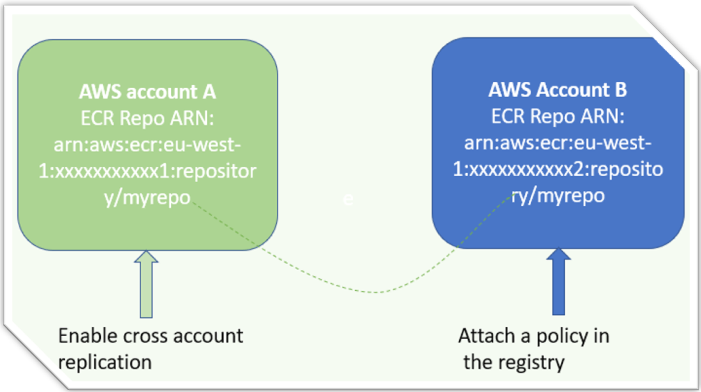
Docker image hosted in ECR in  a AWS account can be replicated into another AWS account by enabling the cross account replication setup. For example, you host a docker image in AWS account A and you have a ECS cluster where you need to deploy the docker image. Â
[Read more…] about How to Enable AWS Cross Account ECR Image Replication
How to Permanently Auto-Mount EFF Volume to EC2 instance using User-Data
Amazon elastic file system( EFS) can be mounted automatically using user-data while spinning up the Instance. This post aims to show both auto and manual mount of EFS volume.
Before you start mounting the EFS volume, make sure that you have the EFS ID with you and the EFS security group is open on port 2049 for the EC2 IP or subnets. [Read more…] about How to Permanently Auto-Mount EFF Volume to EC2 instance using User-Data
3 Steps to setup SSH remote Access to EC2 from Cloud9
3 Steps to Setup EC2 EBS Volume Disk Space Monitoring using Cloudwatch
The default monitoring of Amazon EC2 does not track the EBS disk space. To monitor disk space in EC2 instance, you need can either manually installed Cloudwatch Agent or can use SSM to install the agent. After installing you
Step 1. Instal cloudwatch agent
sudo yum -y install amazon-cloudwatch-agent
Step 2. create a config.json file in the following location.
/opt/aws/amazon-cloudwatch-agent/bin/config.json
{

"agent": {

"metrics_collection_interval": 60,

"run_as_user": "root"

},

"metrics": {

"append_dimensions": {

"AutoScalingGroupName": "${aws:AutoScalingGroupName}",

"ImageId": "${aws:ImageId}",

"InstanceId": "${aws:InstanceId}",

"InstanceType": "${aws:InstanceType}"

},

"metrics_collected": {

"disk": {

"measurement": [

"used_percent"

],

"metrics_collection_interval": 60,

"resources": [

"*"

]

},

"mem": {

"measurement": [

"mem_used_percent"

],

"metrics_collection_interval": 60

}

}

}

}
3 Easy Steps to Create and Deploy AWS SAM Template
AWS SAM template is an abstraction layer, runs on the top of CloudFormation,  for creating serverless resources. So, when you run a SAM template to create a Lambda function or an  API gateway, it generates a CloudFormation stack behind the scene. The main purpose is ease-of-management of serverless resources in AWS.Â
SAM Vs. CloudFormation: when to use AWS Â SAM instead of CloudFormation?
Though there are multiple ways of creating serverless resources like serverless framework, CloudFormation, Terraform, and AWS CDK, the SAM template can be run locally to test your code before deploying it on AWS, which can help to minimize test time and cost as well. Besides, you can use it for rapid prototyping of your serverless applications. [Read more…] about 3 Easy Steps to Create and Deploy AWS SAM Template
How to Create a Helm Chart in Windows for Minikube
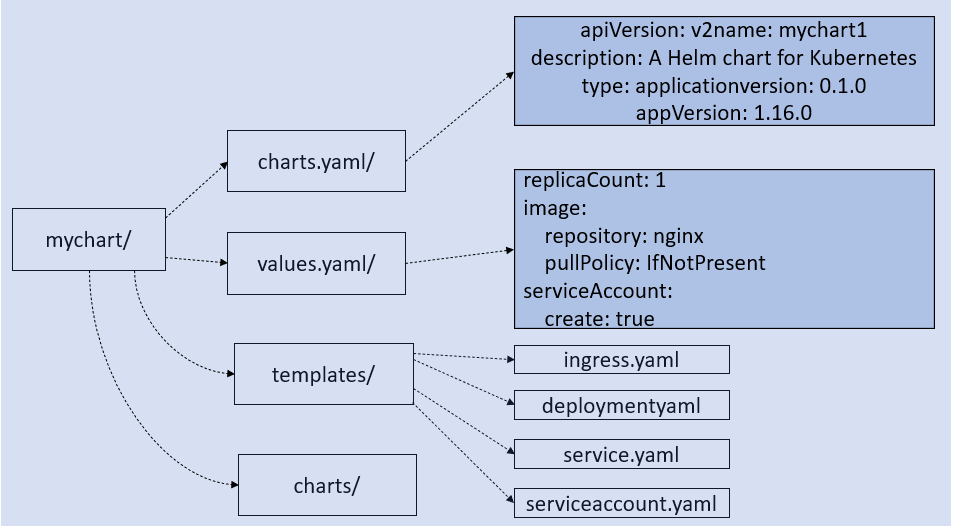
Helm package manager is used to deploy applications in the Kubernetes cluster. By packaging your app using helm allows to deploy it with one command instead of using “kubectl create/apply†command. Another benefit of using helm is that you can easily upgrade and rollback your apps when required because helm uses version control.
Follow the three simple steps creating the helm chart
- Create a skeleton chart using the helm command.
- Update the values.yaml and the templates/ files to meet your deployment requirements
- Package the chart and upload it a helm repository.
[Read more…] about How to Create a Helm Chart in Windows for Minikube
